Skip to content

The Geek Worker

Random Computer Issues And Things That Fixed Them For Me

  • About this Website
  • Helpful Links
  1. Home
  2. Article
  3. iOS iTunes Remote can’t find iTunes Library

iOS iTunes Remote can’t find iTunes Library

July 22, 2015 by geekworker2 min read

The iTunes Remote software on my iPad worked flawlessly with my Macbook Air, but not with my Windows PC. I finally decided to investigate why, and after much search and trial-and-error, I found a solution.

It turns out that it gets confused by IPv6 on Windows (interestingly the same is not a problem on my MacBook, so I blame Windows). Once I disabled TCP/IPv6, iTunes remote started working.

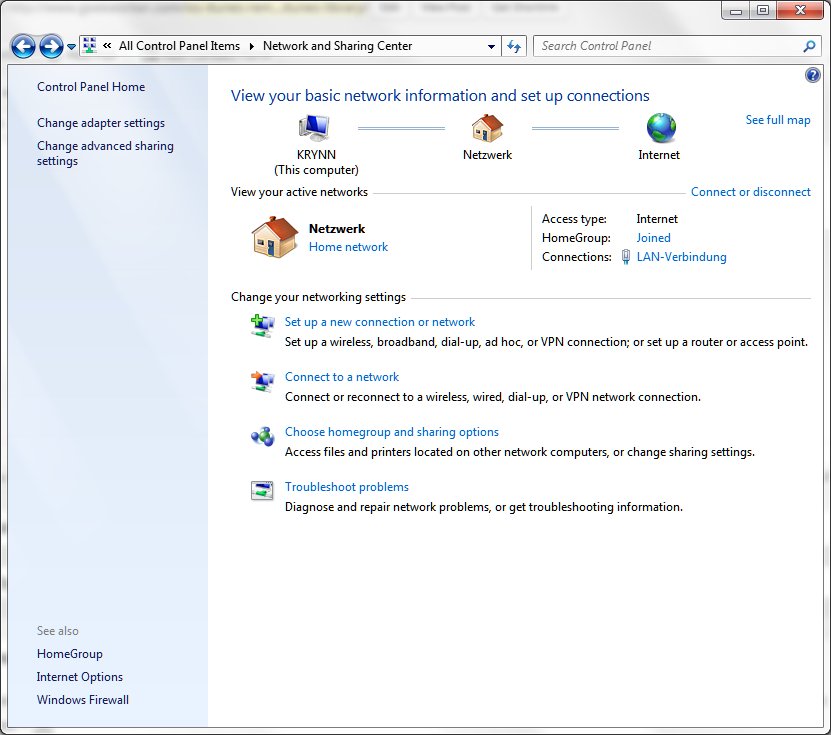
To do so, open your Network and Sharing Center from the control panel. It looks like this:

Next, click on “Change adapter settings”, on the left-hand sidebar of that screen. You’ll get a new window, like this:

Now, most likely yours will be in English (Netzwerk = Network; LAN Verbindung = LAN Connection – Don’t ask me why my Windows insists on using some German terms) and the name of your network card will probably differ, but you want the LAN Connection that connects to the same network that your iPad or iPhone connects to. This might be a WLAN, and I suspect most people only have one network connected to their PC.

Anyway, right-click on the network card and select “Properties”. You’ll need Administrator rights. A new window pops up:

Simply uncheck the checkbox of the “Internet Protocol Version 6” item. Click OK.

One additional step is required.

Even though windows doesn’t ask you to, I found that I had to restart my PC. After that, my iTunes remote found my iTunes library flawlessly.

I hope this helps. And, no, I don’t know what we can do once TCP/IPv6 becomes indispensable – except for hoping for a fix from Apple and/or Microsoft.

Posted in ArticleTagged iOS, iPad, iPhone, IPv6, iTunes, iTunes Remote, Windows

Related Stories

  • February 8, 2025 · Article

    Inkscape: “Document Properties” Window Not Showing Up

    Inkscape sometimes opens the “Documents Properties” window outside the visible area of the desktop. This is how you get it back.

  • December 30, 2023 · Article

    Synology Drive Client does not connect on Apple MacOS

    Synology Drive Client on MacOS refused to connect. Deleting the appropriate logfiles helped.

  • September 13, 2023 · Article

    “The iTunes Store is temporarily unavailable. Please try again later” when trying to subscribe to Podcast

    Currently (September 2023), Apple’s iTunes store seems to have a bug where it’s impossible to subscribe to new podcasts. However, there is a workaround. Find your desired podcast on the iTunes store. Click the “get” button, on the right side of the episode list, for any episode of the podcast. Switch to your library. The […]

Previous story Synology Cloudstation Pauses and Does Not Sync Next story How to get the previous month in OpenOffice

Leave a Reply Cancel reply

Your email address will not be published. Required fields are marked *

This site uses Akismet to reduce spam. Learn how your comment data is processed.

Recent Posts

  • Inkscape: “Document Properties” Window Not Showing Up
  • Synology Drive Client does not connect on Apple MacOS
  • “The iTunes Store is temporarily unavailable. Please try again later” when trying to subscribe to Podcast
  • “Access Denied” Errors with TortoiseSVN on Samba
  • Keyboard and Mouse Microstutters with a Dell Latitude Notebook

Recent Comments

  1. Bart on Gigabyte OSD_Sidekick: “Please check if your USB cable is connected”
  2. Jason on Sony Vegas and Sony Movie Studio: No Audio Tracks In mp4 video filefound
  3. DaReclama on OpenVPN: IP packet with unknown IP version seen
  4. vilva on Excel Formula to get Number of Days in a Month
  5. Michael (Micky) Avidan on Excel Formula to get Number of Days in a Month

Archives

  • February 2025
  • December 2023
  • September 2023
  • July 2022
  • June 2022
  • April 2022
  • November 2021
  • March 2021
  • January 2021
  • August 2020
  • July 2020
  • May 2020
  • January 2020
  • May 2019
  • November 2018
  • July 2018
  • January 2018
  • August 2017
  • January 2017
  • September 2016
  • July 2016
  • October 2015
  • August 2015
  • July 2015
  • June 2015
  • May 2015
  • December 2014
  • November 2014
  • October 2014
  • September 2014
  • August 2014
  • June 2014
  • April 2014
  • February 2014
  • December 2013
  • November 2013
  • October 2013
  • September 2013
  • July 2013
  • June 2013
  • April 2013
  • February 2013
  • October 2012
  • August 2012
  • March 2012
  • January 2012
  • October 2011
  • September 2011
  • August 2011
  • June 2011
  • July 2007

Categories

  • Article

© 2026 The Geek Worker. Proudly powered by WordPress.