The iTunes Remote software on my iPad worked flawlessly with my Macbook Air, but not with my Windows PC. I finally decided to investigate why, and after much search and trial-and-error, I found a solution.
It turns out that it gets confused by IPv6 on Windows (interestingly the same is not a problem on my MacBook, so I blame Windows). Once I disabled TCP/IPv6, iTunes remote started working.
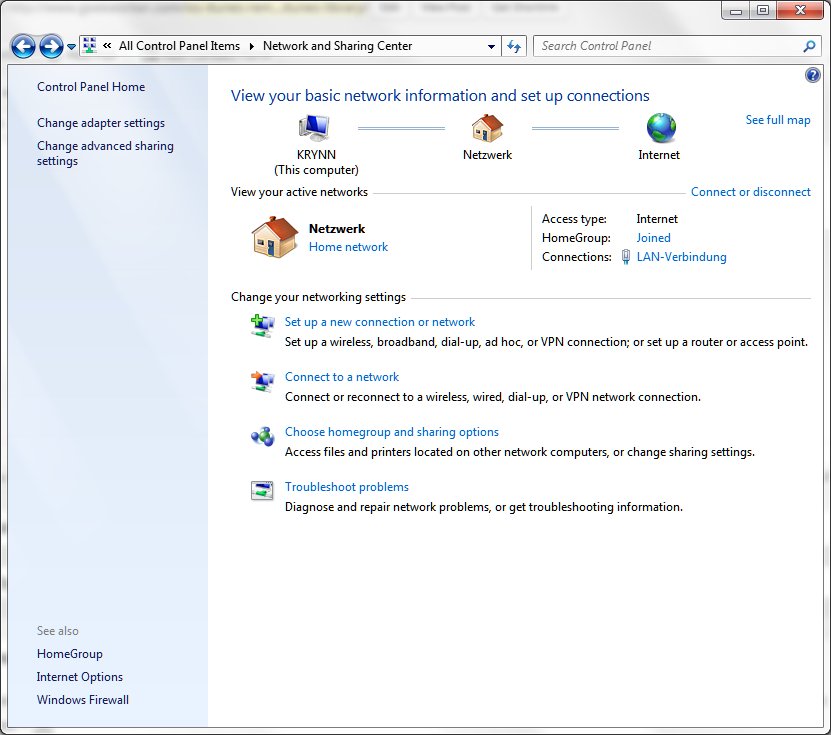
To do so, open your Network and Sharing Center from the control panel. It looks like this:

Next, click on “Change adapter settings”, on the left-hand sidebar of that screen. You’ll get a new window, like this:

Now, most likely yours will be in English (Netzwerk = Network; LAN Verbindung = LAN Connection – Don’t ask me why my Windows insists on using some German terms) and the name of your network card will probably differ, but you want the LAN Connection that connects to the same network that your iPad or iPhone connects to. This might be a WLAN, and I suspect most people only have one network connected to their PC.
Anyway, right-click on the network card and select “Properties”. You’ll need Administrator rights. A new window pops up:

Simply uncheck the checkbox of the “Internet Protocol Version 6” item. Click OK.
One additional step is required.
Even though windows doesn’t ask you to, I found that I had to restart my PC. After that, my iTunes remote found my iTunes library flawlessly.
I hope this helps. And, no, I don’t know what we can do once TCP/IPv6 becomes indispensable – except for hoping for a fix from Apple and/or Microsoft.