Skip to content

The Geek Worker

Random Computer Issues And Things That Fixed Them For Me

  • About this Website
  • Helpful Links

How to get the previous month in OpenOffice

August 1, 2015 by geekworker

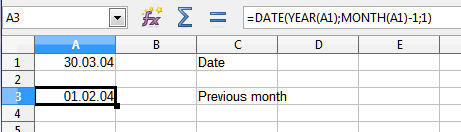
If you need to derive the previous month from a known date, use this formula:

=DATE(YEAR(A1);MONTH(A1)-1;1)

This works in OpenOffice (and LibreOffice), which do not seem to have a native function to do the job, and should work in MS Office Excel as well.

Posted in ArticleTagged LibreOffice, MS Office, OpenOffice
Previous story iOS iTunes Remote can’t find iTunes Library Next story How to Disable WordPress “Prove your Humanity” captcha code question

Leave a Reply Cancel reply

Your email address will not be published. Required fields are marked *

This site uses Akismet to reduce spam. Learn how your comment data is processed.

Recent Posts

  • Inkscape: “Document Properties” Window Not Showing Up
  • Synology Drive Client does not connect on Apple MacOS
  • “The iTunes Store is temporarily unavailable. Please try again later” when trying to subscribe to Podcast
  • “Access Denied” Errors with TortoiseSVN on Samba
  • Keyboard and Mouse Microstutters with a Dell Latitude Notebook

Recent Comments

  1. Bart on Gigabyte OSD_Sidekick: “Please check if your USB cable is connected”
  2. Jason on Sony Vegas and Sony Movie Studio: No Audio Tracks In mp4 video filefound
  3. DaReclama on OpenVPN: IP packet with unknown IP version seen
  4. vilva on Excel Formula to get Number of Days in a Month
  5. Michael (Micky) Avidan on Excel Formula to get Number of Days in a Month

© 2026 The Geek Worker. Proudly powered by WordPress.